As part of the ARCHBIUS document management system, the program sends documents to the client browser in MIME (Multipurpose Internet Mail Extensions) format, a formal extension to the Internet standard for handing embedded files for text, audio, video, or application specific data.
You can control what file types and what MIME types the program uses.
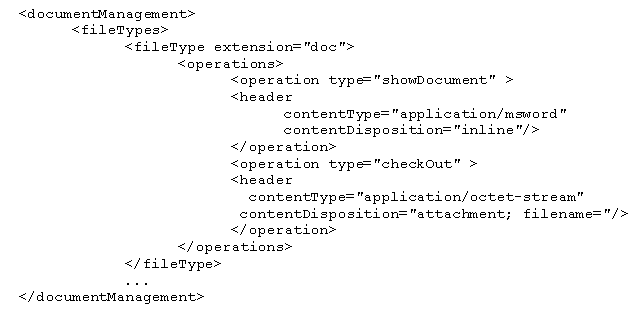
The documentManagement section of the ..\Afmxx\tools\tomcat\webapps\archibus\WEB-INF\config\context\compatibility\afm-config.xml file specifies which types of files users can check in and out of ARCHIBUS
and how they should be displayed when downloaded.
For instance:
After adding an entry such as above to afm-config.xml, you need to add the new type to the "docmanager_allowedDocTypes" array defined on line 41 of the ab-core\views\documents-management\ab-document-support.js file.
The modification to the JavaScript file is necessary to allow the client-side code to check the type of the proposed document being checked in immediately, rather than waiting for the round-trip to the server.
For example, if the administrator wishes to authorize .png image files to be allowed in the Document Management system, they must modify both the afm-config.xml and ab-document-support.js files:
When the user attempts to check in a png image file and they browse to such a file in the check-in dialog, the assignment will not cause a warning message and prevent the check- in from proceeding.
Including a fileType entry permits that type of file to be uploaded
and downloaded.
The header tag specifies the MIME instructions that are included in the message back to your browser in the header announcing the file.
The RFC 2183 content dispositions that are of most relevance are:
Some typical built-in types are:
|
File Extension |
Description |
|
bin |
application/octet-stream |
|
bmp |
image/bmp |
|
c |
text/plain |
|
css |
text/css |
|
avi |
video/x-msvideo |
|
dwg |
drawing |
|
exe |
application/octet-stream |
|
gif |
image/gif |
|
gtar |
application/x-gtar |
|
gz |
application/x-gzip |
|
hlp |
application/winhlp |
|
htm |
text/html |
|
html |
text/html |
|
jpe |
image/jpeg |
|
jpeg |
image/jpeg |
|
jpg |
image/jpeg |
|
js |
application/x-javascript |
|
lzh |
application/octet-stream |
|
mov |
video/quicktime |
|
mpg |
video/mpeg |
|
mov |
video/quicktime |
|
mp3 |
audio/mpeg |
|
ppt |
application/vnd.ms-powerpoint |
|
ra |
audio/x-pn-realaudio |
|
rtf |
application/rtf |
|
txt |
text/plain |
|
xls |
application/vnd.ms-excel |
|
zip |
application/zip |