The AXVW format allows for arbitrary HTML content to be included into
the final HTML page. The HTML content can be added inside the special html element, and will be copied
into the final HTML page verbatim.
Custom HTML content can be used to replace a field input control. The field can still display its title.
<field>
<!-- ui fields can still have translatable titles -->
<title>Project Type</title>
<html>
<!-- Everything inside the ui element will be copied into the output HTML verbatim. -->
<input type="radio" name="project_types" value="MOVE"
onclick="set_project_type(this.value)">Move</input>
<input type="radio" name="project_types" value="LEASE"
onclick="set_project_type(this.value)">Lease</input>
<input type="radio" name="project_types" value="PROPERTY"
onclick="set_project_type(this.value)">Property</input>
<input type="radio" name="project_types" value="N/A"
onclick="set_project_type(this.value)">N/A</input>
</html>
</field>
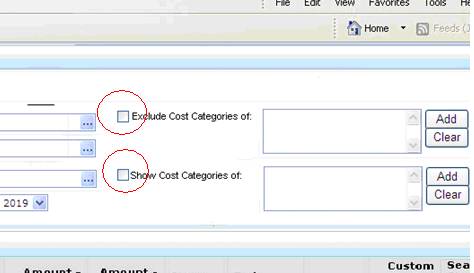
The field title itself may also include HTML. In the example below, a checkbox is displayed to the left of the field title:
<field colspan="2" rowspan="2">
<title><input type=”checkbox” onclick=”js_function();”/>Exclude Cost Categories of</title>
<html>...
For use of JavaScript handlers with custom HTML form fields, Using JS Event Handlers.