Sites have flexibility in adding new applications, processes, and tasks to ARCHIBUS Process Navigators.
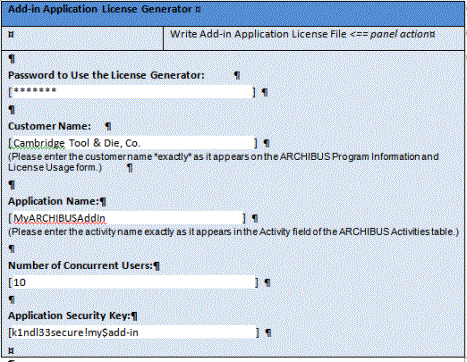
Third-party developers in the ARCHIBUS Developer Network can create licenses that copy-protect their own third-party add-ins. These developers can create the license themselves without needing to obtain it from ARCHIBUS, Inc.
You can create new Process Navigator and Dashboard processes at will and name them what you like. ARCHIBUS enables these processes as long as:
You can use any view from any domain or application that you have licensed from ARCHIBUS on any of your processes or dashboards. You can also use any views you have created yourself, such as views you created using the View Definition Wizard, so long as those views reference tables included by your licensed domains or applications.
Note: A table is included in a domain or application if it appears in any of the views for that domain or application. For instance, the “Country” (ctry) and “Rooms”(rm) tables appear in the views of the Space Inventory & Performance application. As such, they are included and can be used in views by any licensed user of that application.
Do not use views from any ARCHIBUS domain or application that you have not licensed, as it will not load and its workflow rules will not run.
If you are using domain-style licensing, you can use the views in your domain on any new process you wish, for as many users as you wish (up to, of course, the total number of named and concurrent users your site has licensed).
If you are using application-style licensing, determine the count of users for each application according to the number of users that will be using it, regardless of how they will be using it. ARCHIBUS will always sign out an application license for each user using all or part of an application.
For instance, if you assign an entire process from the Space Inventory & Performance application to User ABERNATHY, or if you assign just one view from the Space Inventory & Performance application to User ABERNATHY (by creating a new process, adding this view to the process), the program will sign out a Space Inventory & Performance application license when ABERNATHY signs in and start using ARCHIBUS.
Note: Since you can create your own new processes, even for stock ARCHIBUS applications, ARCHIBUS does not support users creating new domains starting with V19.1. However, if you created your own domains in V.17.1 and V.18, to upgrade you must create application licenses as described below for third-party applications.
The ARCHIBUS Administrator controls which users consume which licenses:
Customers can add entire new applications. To do so, name the application beginning with AbMyExtension; for example, create applications such as “AbMyExtension01”, “AbMyExtension02”, “AbMyExtensionForChargeback”.
Place your new application under any domain that you wish. You can see the current domain assignments in System Administration / ARCHIBUS System Administration / Add-In Manager / View Application Assignments to Domains view.
In your own new applications, you can use any view from any domain or application for which you have a license.
You cannot use a view from any ARCHIBUS domain or application for which you do not have a license, as the view will not load and its workflow rules will not run.
In ARCHIBUS V.19.2 and later, third-party developers registered with the ARCHIBUS Developers Network program can create their own applications with their own names, such as MyARCHIBUSAddIn." They want to distribute these applications to their customers, while copy-protecting them using their own license file.
To do so:
Note: This naming recommendation differs from the recommendation for versions V.14.3 through V.18.2, which required that you use a prescribed application name.