An important component of the manufacturer's SDS is the chemical constituents of the hazardous product. These constituents are needed for chemical inventory reporting. To assign the constituent chemicals to an SDS, you need to have the chemicals in a reference list. While you don't need a complete list of constituent chemicals at the outset, typically you will want to add chemical constituents to this reference list as you progress through the entry of your SDSs.
A hazardous product for which you create an SDS may be composed of a combination of chemicals. Use this task to define the chemicals that you will list on an SDS.
Because chemical names are long and difficult to type, having a list of chemicals to pick from when completing the SDS speeds the data entry process. In addition to the chemical name, you can enter standard identifiers, such as a CAS number, to aid in finding a particular chemical.
As a convenience, the Chemicals table is already completed with a number of chemicals that typically require SDSs. The SDS application ships with a "sample" list of chemicals. This list is not intended to be comprehensive and is provided as a courtesy without warranty for accuracy. It is recommended that you review this data for completeness and relevance to your facility.
Once you define chemicals, you can run the Business Process Owner / Chemicals List report and the Review Material Inventory / Chemical Constituent Locations report, which enables you to find the locations for a specific constituent even if it is just a component of another product. For example, if your safety officer is imposing a new handling procedure for a particular chemical, you would need to know the products that contain that chemical.
You may find the following sites helpful when completing this table:
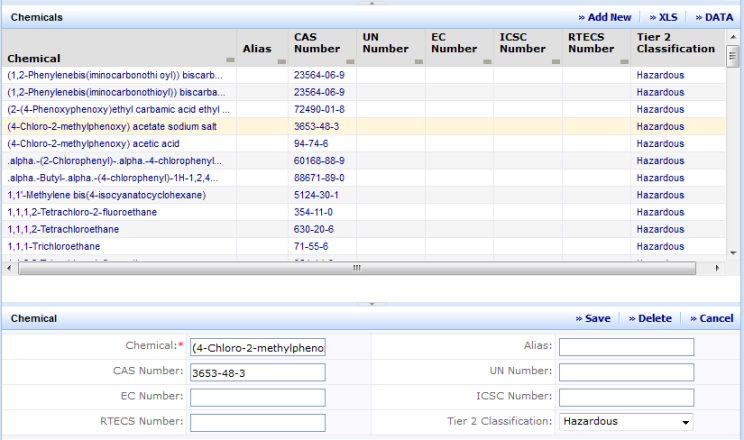
The Define Chemicals view has two parts, a selection list of chemicals including a Smart Search filter, and an edit form where data is entered and modified.
When the view is first presented, a grid listing at the top of the screen automatically lists all chemicals in the system up to the limit of the grid. It is likely that the number of chemicals in the system will be large (possibly in the thousands). Consequently, the number of chemicals that can be shown in the grid is limited for performance reasons. This means that you will probably need to filter the grid to view the chemicals of interest. With the Smart Search console you can filter or sort data on any of the displayed columns. For example, you might want to see all of the chemical names that contain "chloroethane." To do so, enter %chloroethane% in the Chemical field and press Enter. See Restricting Data Using the Smart Search Console.
| Field | Purpose |
|---|---|
|
Chemical |
(Required Field) The name of the chemical. This value must be unique. |
|
CAS Number |
CAS numbers are unique identifiers assigned by the Chemical Abstracts Service to chemicals, including elements, isotopes, organic and inorganic compounds, organometallics, metals, and nonstructurable materials. |
|
EC Number |
|
|
RTECS Number |
The Registry of Toxic Effects of Chemical Substances identifier . |
|
Alias |
Another name by which the chemical may be known. |
|
UN Number |
United Nations number. A four-digit number assigned to potentially hazardous products. UN numbers are used by emergency response personnel for identification of materials during transportation emergencies. UN numbers are internationally recognized. |
| ICSC Number | International Chemical Safety Card number. |
| Tier II Classification |
Hazard classification provided by the EPA. This classification determines if a material is a candidate for Tier I or Tier II Chemical Inventory reporting. Possible values are:
|
To add a new chemical:
To edit data for an existing chemical:
The Chemical pane appears showing information about the chemical.
To delete data for an existing chemical:
The Chemical pane appears showing information about the chemical.
| Copyright © 1984-2016, ARCHIBUS, Inc. All rights reserved. |