The following sections apply especially to system administrators:
All inbound connectors begin with the prefix IN-; all outbound connectors begin with the prefix OUT-.
Navigate to System Administration / System Administrator / Configure Connectors to view a list of all inbound and outbound connectors.
Configure individual or master connectors in the Configure Connectors view:
System Administration / System Administrator / Configure Connectors (
afm-connector-define-tabs.axvw)
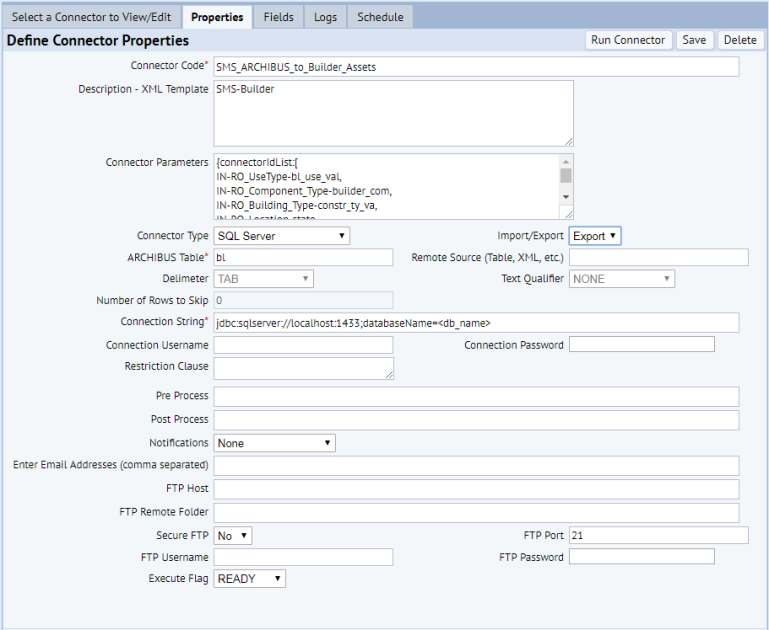
Open Define Connector Properties under the Properties tab:
Note: In Description - XML Template, do not change the character string, SMS-Builder. Application code searches for this value in the master connector's description.
See Configure Master Connectors for steps required to configure a master connector. After configuration, run master connectors from Asset Management / Enterprise Asset Management / Extensions for BUILDER SMS / Reconcile Enterprise Assets (ab-eam-reconcile-console.axvw).
Note: Run master connectors only from Reconcile Enterprise Assets, not from System Administration / System Administrator / Execute Connectors (afm-connector-exec.axvw).
After you run a master connector or individual connector, review data transfer logs from this System Administration view:
System Administration / System Administrator / View Connector Logs (
afm-connector-view-log.axvw)
If an error occurs during data transfer, check messages in the connector log to troubleshoot.
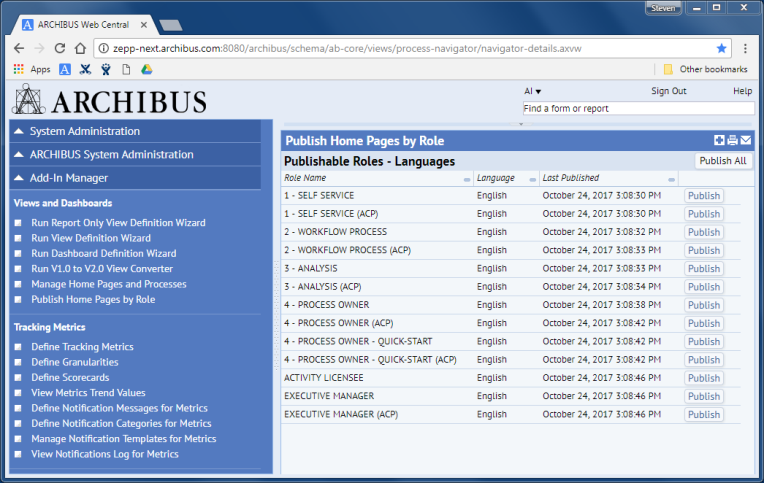
To publish home pages that display BUILDER™ SMS data for selected roles, or for all roles:
To publish a home page for one role, click Publish to the right of the desired role. To publish home pages for all roles, click Publish All at the upper right.
A message confirms publication of the page or pages.
Note: If BUILDER™ SMS home pages do not appear as you expect, delete the browser cache and log into ARCHIBUS Web Central again.
See also
View Connector Properties and Field Definitions
Configure Connectors (System Management Help)
| Copyright © 1984-2019, ARCHIBUS, Inc. All rights reserved. |