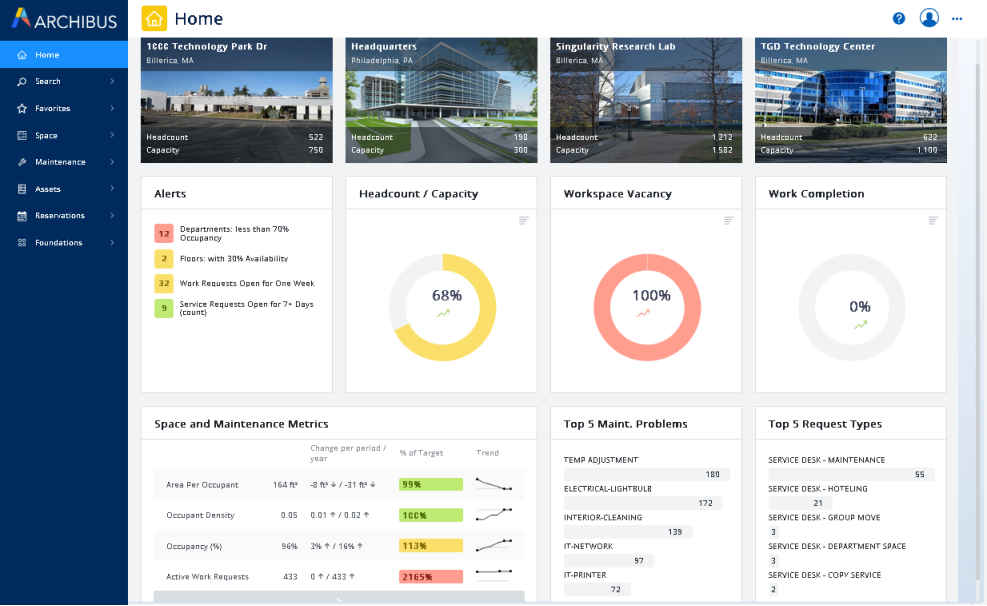
For the various roles and users in an organization, an Archibus administrator can design home pages that offer information focused for this type of user. Home pages list important metrics, statistics, and alerts so that you can quickly determine the state of your issues and critical issues. Home pages display in the workspace area to the right of the sidebar navigation panel.
When you sign in to Archibus, Archibus loads the appropriate home page based on your account. For example, if you are an energy manager your account might present the Energy Manager home page. Below is the default home page for the Modules Manager (AFM-MOD).
Clicking "Home" in the sidebar navigation panel accesses your default home page.
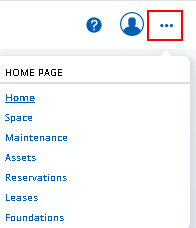
Typically, you will be assigned just one home page. However, if you are signed in with a role that has multiple home pages, you can toggle between the pages using the Home Page menu, accessed from the Select Home Page icon, below. For example, the sample AFM-MOD user is assigned multiple home pages, and their Home Page menu appears as below. Note that the menu underlines the home page that is currently loaded.
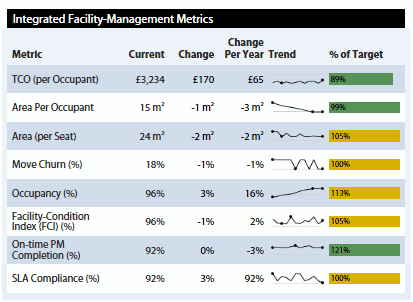
The default home pages focus on metrics, alerts, maps, and so on. You can click on a metric to drill into the composing data. See Tracking Metrics.
Although the default home pages focus on metrics, it is possible to add tasks to a home page so that users can access tasks from the home page rather than from the sidebar navigation panel. If you sign in as AFM-MOD, you will see that the Leases home page is an example of a home page that presents tasks.
You may want to change the provided home pages or create your own home pages. For example, you may want to add frequently-used tasks or URLs to a home page, or add a different set of metrics.
For information, see the following topics in System Management Help:
| Copyright © 1984-2020, Archibus, Inc. All rights reserved. |