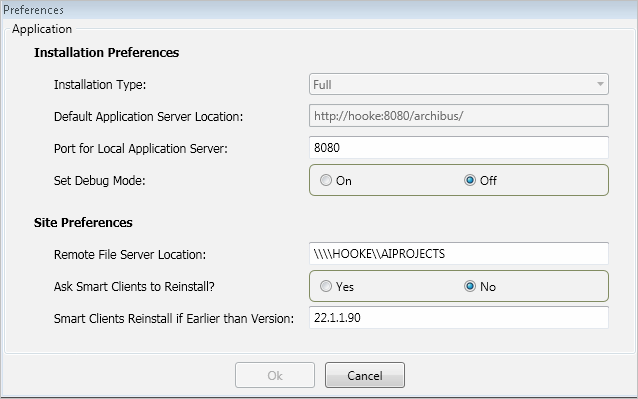
As the System Administrator for a single user workstation or for a workgroup, you can use the ARCHIBUS Setup Console to set installation and remote Smart Client preferences.
Access the Preferences form by running the Preferences command from the ARCHIBUS Setup Console.
The following table describes the application preferences:
| Preferences | Description | Default/Example |
|---|---|---|
| Installation Preferences | ||
| Installation Type |
From the ARCHIBUS Setup Console, the installation type is always full. This is set by the installation program: |
Full. |
| Default Application Server Location |
This is the ARCHIBUS application server to which to connect if there is not a server specified in the per-user preferences. The default application server is set by the installation program:
|
Example: \\http:workgroupsvr:8080\archibus |
| Port for Local Application Server |
Specifies the port on which to start the Jetty application server (for example, "8080" as in "localhost:8080\archibus"). The default server is "8080". The port number is used only by full Smart Client installs, as the remote Smart Client never starts the application server. When starting the application server, the Smart Client first tests if the given port is available; if not, the program starts searching for the first available port at 8080, then searches 8081, and so on, until it finds a free port. If the Smart Client has to search for a free port, it updates this Port for Local Application Server value in user.properties, and it also updates the Default Application Server Location in smartclient.properties, so that the connect port will be available to subsequently installed remote Smart Clients. |
Examples: 8080 8081 |
| Set Debug Mode | The Set Debug Mode On/Off command toggles the debug=true/false value in the WEB-INF\config\debug.properties file. If you change this setting, the next time the System Administrator restarts the application server, it will be in or out of debug mode, per this setting. |
The default is Off. |
| Site Preferences | ||
| Remote File Server Location |
The Remote Server URL to use if the user has not set a URL in the per-site preferences. The Smart Client-only installation copies this value to the application preferences of the same name. Location: C:\Documents and Settings\All Users\ARCHIBUS\projects\remote-client-install\smartclient.install.properties |
Example: http://workgrpsvr:8080/archibus/ |
| Ask Smart Clients to Reinstall? | This parameter indicates whether the remote Smart Clients should reinstall if they have an older version of the Smart Client program. Set this to Yes when you are upgrading. | Defaults to No |
| Smart Clients Reinstall if Earlier than Version? |
Enter the version you are installing. If this version (for example, 19.2.02.100) is later than the build number embedded in the Smart Client (for example, 19.1.01.100); then the program prompts the user to reinstall. |
The program does a string compare to determine if the build is later than your entry. |
Based on the presence of programs on your system, the full installation sets application preferences, such as the installation type, the default application server location, and the port for the local application server. The default values set by the installation program enable the single-user and workgroup configurations to start with no changes to the preferences if the program is installed or copied to the default folder locations.
Application preferences are stored in the InstallDir\SmartClient\SmartClient.Common.dll.config file.
Remote Smart Client preferences apply to remote client-only installations, enabling System Administrators to manage remote Smart Clients. The values for the Remote Smart Client preferences apply to all users working from a particular server.
Remote Smart Client installation preferences enable the system administrator to set preferences that are applied to each Smart Client the system administrator installs.
The full setup sets these preferences for remote Smart Clients:
http://<serverName>:8080/archibus/.\\\\<serverName>\\archibus (The extra backslash enables Java to correctly read the path.)For client-only installations (remote Smart Client deployments), the setup-smart-client-only.exe copies the default application server location from the preference of the same name in the per-site preferences file (WEB-INF\config\smartclient.properties).
Using the default application server location (DefaultAppServerLocation preference), the Smart-Client finds the application server, and from the application server, the Smart Client queries (through a WebService) the values for the Remote Smart Client Preferences file and the projects file. In this way, your system administrator does not have to set up preferences on each client workstation, and if the administrator changes a per-site preference like the Remote File Server or the list of available projects, all client workstations automatically get this change. See Adding Enterprise Projects to the afm-projects.xml File.
Before running the installation program for a remote Smart Client, in the \ARCHIBUS\projects\remote-client-install\smartclient.install.properties file, replace workgrpsvr with the actual server name (if the full installation did not update this server name).
The setup reads the smartclient.install.properties file, gets the value of applicationServerLocation and sets the following preferences under the settings node in SmartClient.Common.dll.config:
The Smart Client requests the following values from the application server which provides the values that are in the smartclient.properties file. You access these preferences by running the Preferences command from the ARCHIBUS Setup Console. Remote Smart Client preferences are in the Site Preferences section of the form.
| Copyright © 1984-2016, ARCHIBUS, Inc. All rights reserved. |