Asset Management / Asset Management / IT Asset Manager / Telecom Console
Asset Management / Enterprise Asset Management / IT Asset Manager / Telecom Console
Asset Management / Telecom Asset Management / Telecom Management / Telecom Console

Highlight Rooms with Connected Telecom Devices

In addition to having the system show connected items on the floor plan, you may wish to see the rooms holding devices to which an item is connected.

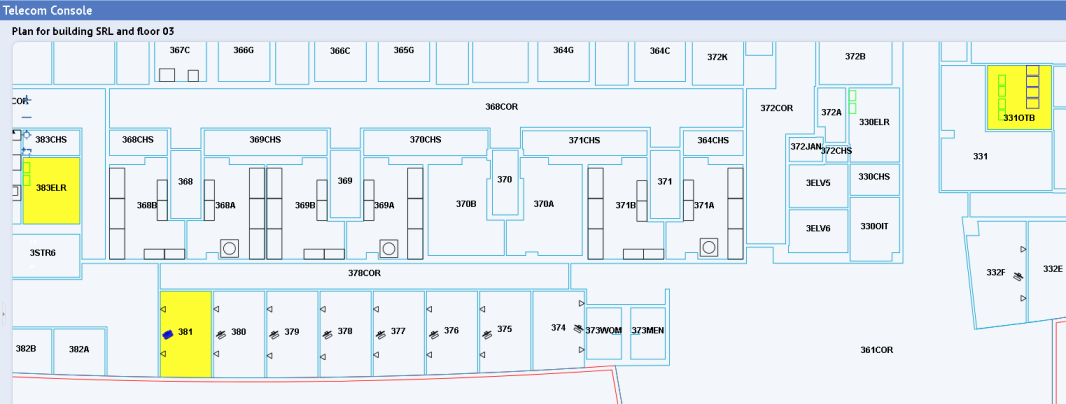
The Highlight Connected Rooms command, available from the right-click menu, highlights the rooms that contain devices connected to the selected item. For example, the below image shows the rooms housing telecom devices to which the PC in room 381 is connected.
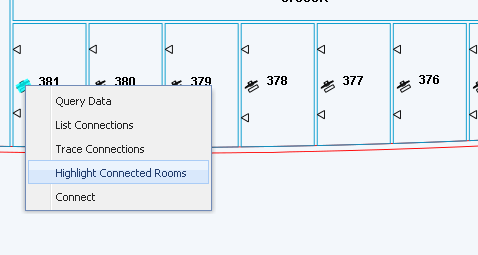

To highlight rooms with connected devices:

  1. On the floor plan, right-click on the asset for which you want to see the rooms holding connected devices.
  2. On the resulting pop-up menu, choose Highlight Connected Rooms.
  3. The system highlights the rooms housing devices that connect to this item.
  4. When through, click the Reset button (located in the upper right corner) to remove the highlights.


You can also view connected devices with these methods:

Copyright © 1984-2016, ARCHIBUS, Inc. All rights reserved.