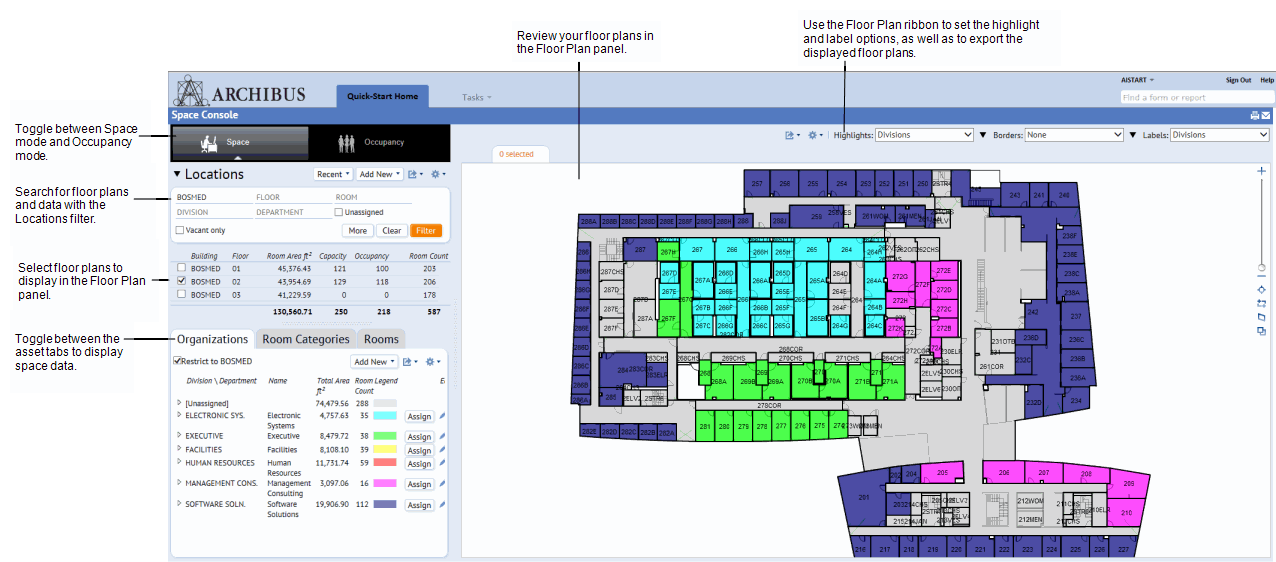
The Space Console is a multi-faceted tool for managing your space and occupancy. With the Space Console, you can perform such tasks as:
The Space Console works with data from:
Start the Space Console from:
Find the Data and Floor Plans that you Need (Locations Filter)
Display Floor Information and Floor Plans
Display Category, Organization, Room, or Employee Information (the Space Console's tabs)
Display Room Standard Information
Hide and Display Data (Select Fields)
Export Space and Occupancy Data to Excel and Word
Change the Pan and Zoom of Displayed Floor Plans
Highlight Rooms in your Floor Plan by One Property
Highlight Rooms in your Floor Plan by Two Properties
Include Labels on the Floor Plan
Export Highlighted and Labeled Floor Plans to Word or PDF
Set Options for Printing Floor Plans
Review Rooms for a Particular Division or Department
Review Rooms on a Floor Plan by Division or Department
Review Rooms by their Use (Room Category and Type)
Review Usable and Non-occupiable Space on a Floor
Review a Department's Vacant Rooms
Select Rooms on the Floor Plan and View or Change their Properties
Change a Room's Division or Department Assignment
Change a Room's Category or Type Assignment
Create an Employee Occupancy Plan
Select Rooms on the Floor Plan and View or Change the Properties of Occupying Employees
Change Employee Room Assignments
Remove an Employee from a Room
Create a New Employee and Assign to a Room
Place Employees on a Wait List for Available Rooms
Generate a Move Order for Moving Employees
Check an Employee's Team Assignment History
Assign Rooms to Teams using the Floor Plan
Assign Rooms to Teams using a Form
Check for Team Space on other Floors
Change or Cancel Team Assignments
| Copyright © 1984-2016, ARCHIBUS, Inc. All rights reserved. |